
You've spent hours crafting amazing content for your website. You hit publish, wait for the traffic to roll in, and... nothing. Crickets. Your brilliant blog post sits there, buried somewhere on page 47 of Google where no one will ever find it.
Sound familiar?
Here's the thing: great content alone isn't enough. Search engines need help understanding what your content is about, and that's exactly where on-page SEO comes in.
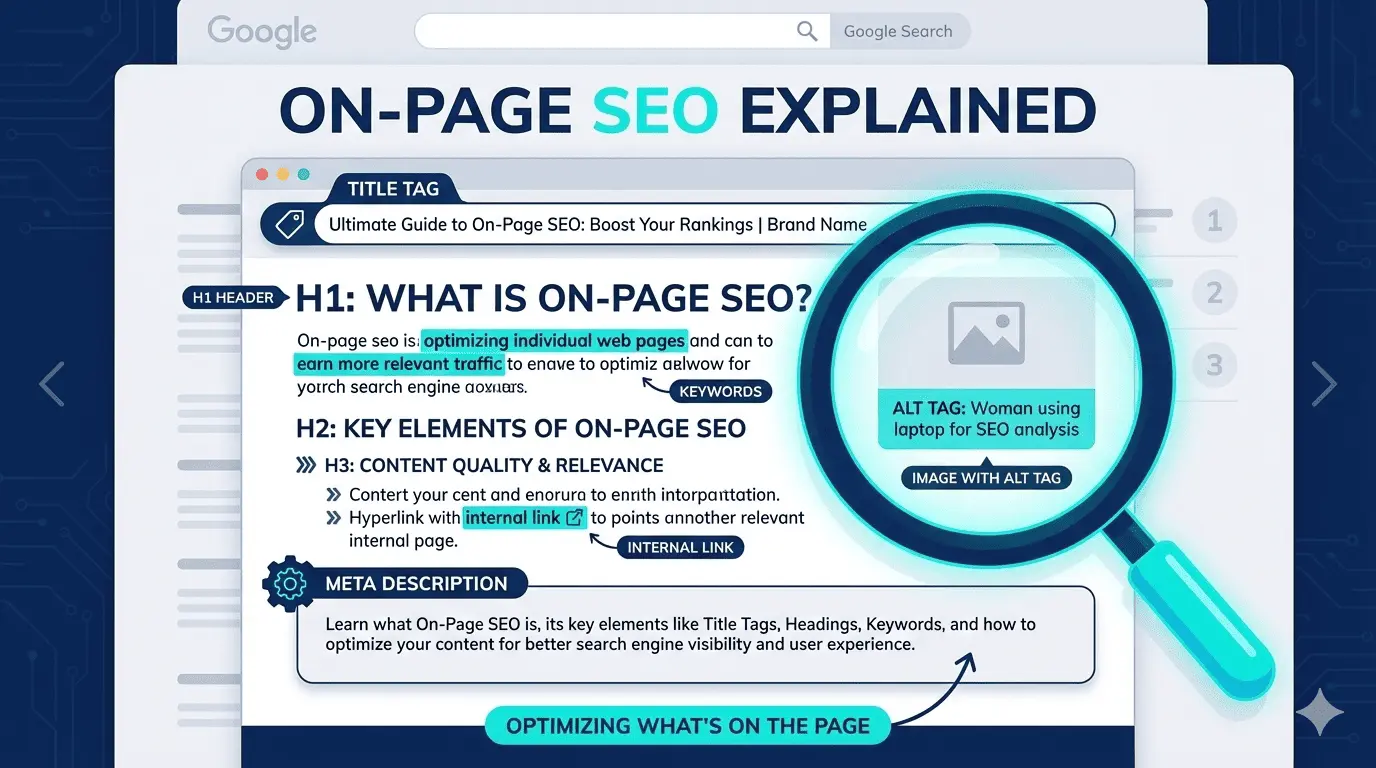
So, what is on-page SEO? Simply put, on-page SEO is the practice of optimizing individual pages on your website to rank higher in search engines and attract more relevant traffic. It's about making your content easier for search engines to understand and more appealing for users to click and read.
In this guide, I'll walk you through everything you need to know about on-page SEO—what it is, why it matters, and exactly how to do it. Don't worry if you're completely new to this. We'll take it step by step, and by the end, you'll have a clear roadmap to start optimizing your own pages today.
If you're wondering what on-page SEO is and why everyone keeps talking about it, you're in the right place. Let's dive in.
What Is On-Page SEO? (The Clear Definition)
Let me give you a few different ways to think about on-page SEO so it really clicks.
The simple definition: On-page SEO (also called on-site SEO) refers to all the optimizations you make directly on your website's pages to help them rank higher in search engines. It's about making your content easier for search engines to understand and more appealing for users to click and read.
Here's a helpful analogy: Think of on-page SEO like organizing a library. When you label books clearly, create logical categories, and write compelling descriptions, people can find exactly what they need. On-page SEO does the same thing for your website—it organizes and labels your content so both search engines and real people can easily discover and appreciate it.
Or think of it this way: it's like dressing up your website content in a way that search engines can easily read and appreciate, while also making sure visitors have a great experience once they arrive.
What On-Page SEO Includes
When you're doing on-page optimization, you're working with:
- Your actual written content (the most important element)
- HTML elements like title tags, meta descriptions, and header tags
- Images and other media on your pages
- The overall user experience of each page
- Strategic keyword placement throughout your content
- Internal links connecting your pages
- URL structure and formatting
What It's NOT
Let's clear up some confusion right away. On-page SEO is NOT:
- Link building from other websites (that's off-page SEO)
- Technical site architecture and crawlability (that's technical SEO)
- Trying to trick or manipulate search engines
- Some magic formula that guarantees instant rankings
Why This Matters
Here's the reality: search engines can't "read" content the way humans do. They're sophisticated, sure, but they still need clear signals to understand what your page is about, who it's for, and whether it deserves to rank.
On-page SEO translates your content into search engine language. When you optimize properly, search engines can confidently match your pages with the right search queries. Better optimization leads to better visibility, which leads to more traffic, which ultimately means more customers, readers, or whatever success looks like for your website.
On-Page SEO vs. Off-Page SEO vs. Technical SEO
Before we go further, let's make sure you understand where on-page SEO fits into the bigger SEO picture. There are actually three main types of SEO, and they all work together.
On-Page SEO (On-Site SEO): This is what you do ON your website pages. You have complete control here. It includes optimizing your content quality, title tags, meta descriptions, headers, images, internal links, and keyword usage. The focus is on content quality and optimization to make each page as relevant and valuable as possible.
Off-Page SEO: This is what happens OFF your website. It's about building your site's authority and reputation across the web. Examples include earning backlinks from other websites, getting mentioned on social media, building your brand presence, and guest posting. You have less direct control over these elements. The focus is on building trust and authority externally.
Technical SEO: This is the behind-the-scenes optimization that helps search engines crawl and index your site effectively. It includes things like site speed, mobile-friendliness, XML sitemaps, structured data (schema markup), security (HTTPS), and how easily search engines can access your pages. The focus is on the technical foundation that makes everything else possible.
Here's the Easiest Way to Remember the Difference
Think of SEO as a three-legged stool—you need all three legs for it to stand properly:
- On-page SEO = What you say (your content and how you present it)
- Off-page SEO = What others say about you (backlinks and mentions)
- Technical SEO = How easily people can access what you say (site functionality)
All three types work together, and you can't ignore one and expect great results. This article focuses specifically on on-page SEO—the foundation everything else builds on. After all, there's no point in getting backlinks to a poorly optimized page, right?
Why On-Page SEO Matters
Let me make this really clear: on-page SEO isn't some optional extra. It's absolutely essential. Here's why it matters for everyone involved.
For Search Engines
Search engines like Google use on-page signals to:
- Understand what your content is about and what topic it covers
- Determine which search queries your page should rank for
- Assess the quality and relevance of your content
- Decide where you should appear in search results compared to competitors
Without proper on-page optimization, even the best content can get overlooked because search engines simply don't understand it well enough.
For Your Business or Website
On-page SEO directly impacts your bottom line:
- Increased organic traffic: Better rankings mean more visitors, and this traffic is free (unlike paid ads)
- Higher quality visitors: You attract people who are actually searching for what you offer
- Better click-through rates: Optimized titles and descriptions get more clicks from search results
- Improved user experience: When you optimize for search engines the right way, you're also creating a better experience for real people
- Competitive advantage: Many websites ignore SEO basics, so doing it right puts you ahead
For Your Users
When you do on-page SEO properly, your visitors benefit too:
- They can find exactly what they're looking for more easily
- Your pages load faster and look better
- Content is more readable and scannable
- Clear titles help them choose the right result from search pages
- Better organization helps them navigate your site
The Real-World Impact
Here's something to get excited about: organic search (meaning unpaid search results) drives more than half of all website traffic on average. That's a massive opportunity.
And here's the key insight: you can't build authority through off-page SEO on a poorly optimized foundation. On-page SEO is where everything starts. Get this right first, and everything else becomes easier and more effective.
Essential On-Page SEO Elements Explained
Now that you know what on-page SEO is, let's break down the specific elements you'll be optimizing. Don't worry—we'll take it step by step, and I promise it's more straightforward than it might seem at first.
For each element below, I'll explain what it is, why it matters, and exactly how to optimize it.
1. Content Quality & Relevance
This is the absolute foundation of everything. Your content is the main event—all the other on-page elements simply support it.
What it is: Content quality means creating valuable, comprehensive information that genuinely helps your audience. Relevance means matching what people are actually searching for.
Why it matters: Google's algorithms have gotten incredibly sophisticated at recognizing quality content. You simply can't trick your way to the top anymore with thin, low-value pages. The sites that rank well consistently provide the best answers to users' questions.
How to optimize it:
- Match search intent: Before you write, look at what's already ranking for your target keyword. What format are those pages? What questions do they answer? Your content needs to match what searchers expect to find
- Be comprehensive: Cover your topic thoroughly. Answer the main question plus related questions someone might have
- Provide unique value: Don't just rehash what everyone else says. Add original insights, examples, or research
- Write for humans first: Yes, SEO matters, but if your content reads like it was written for robots, people will bounce
- Keep it fresh: Update content regularly with new information and current examples
- Make it engaging: Use stories, examples, and a conversational tone to keep readers interested
Common mistake to avoid: Writing thin content just to target a keyword. A 300-word fluff piece won't outrank a comprehensive 2,000-word guide that actually helps people.
2. Title Tags
Your title tag is the HTML element that defines your page title. It's one of the most important on-page SEO elements.
Where users see it:
- As the blue clickable headline in search results
- In browser tabs at the top of the page
- When your page is shared on social media
Why it's critical: Your title tag is often the first impression you make. It's a major ranking signal that tells search engines what your page is about, and it directly impacts whether people click on your result or scroll past it.
How to optimize it:
- Length: Keep it between 50-60 characters. Google typically displays the first 50-60 characters in search results. Longer titles get cut off with "..."
- Include your primary keyword: Preferably near the beginning of the title where it carries more weight
- Make it compelling: This isn't just for SEO—it's your ad copy. Make people want to click
- Accurately describe the page: Don't use clickbait. The title should honestly reflect what's on the page
- Make it unique: Every page on your site needs its own unique title tag
- Include your brand name: Usually at the end, if space allows (e.g., "Page Title | Brand Name")
A simple framework: "Primary Keyword | Benefit or Hook | Brand"
Good example: "What Is On-Page SEO? Complete Beginner's Guide [2026]"
Poor example: "SEO | On-Page SEO | SEO Guide | Learn SEO | Best SEO Tips" (keyword stuffing, not compelling)
3. Meta Descriptions
The meta description is the short summary that appears below your title tag in search results. It's that little paragraph of text that helps people decide whether to click.
Important fact: Meta descriptions don't directly impact your rankings. Google has confirmed this. However, they heavily influence your click-through rate, which does impact your performance.
How to optimize it:
- Length: Aim for 150-160 characters. Google displays approximately this much (it varies)
- Include your target keyword: When someone's search query appears in your meta description, Google bolds it in the search results, making your listing stand out
- Write compelling copy: Think of this as ad copy. What would make someone click your result instead of the nine others on the page?
- Include a call-to-action: Phrases like "Learn how," "Discover," "Find out," or "Get started" can encourage clicks
- Be accurate: Just like with title tags, don't mislead people. Describe what's actually on the page
- Make each one unique: Duplicate meta descriptions waste an opportunity to give each page its own pitch
Good example: "Learn what on-page SEO is and how to optimize your website pages to rank higher in search engines. Complete beginner's guide with step-by-step tips you can use today."
Poor example: "This page is about on-page SEO and how to do SEO on your website pages for better rankings." (boring, not compelling, no clear benefit)
4. Header Tags (H1-H6)
Header tags structure and organize your content. They show the hierarchy and make your content scannable for both users and search engines.
The structure:
- H1: Your main page title (only one per page)
- H2: Major sections of your content
- H3: Subsections under your H2s
- H4-H6: Further nested content (used less frequently)
Why they matter: Headers break up your content visually, making it much easier to scan. They also signal to search engines which parts of your content are most important and how everything relates.
How to optimize them:
- Use only one H1: This should be your main page title. Don't use multiple H1 tags
- Include keywords naturally: Work your target keywords into headers where it makes sense, but never force it
- Make them descriptive: Each header should clearly tell readers what that section is about
- Follow proper hierarchy: Don't skip levels (like going from H2 to H4). Nest them properly
- Use them frequently: Break up long content with headers every 200-300 words
Example structure:
H1: What Is On-Page SEO? Complete Beginner's Guide [2026]
  H2: What Is On-Page SEO? (The Clear Definition)
    H3: What On-Page SEO Includes
    H3: What It's NOT
  H2: Why On-Page SEO Matters
    H3: For Search Engines
    H3: For Your Business
Common mistake: Using headers just to make text bigger or bold without following proper structure. Headers should organize your content logically, not just format it.
5. URL Structure
Your URL is the web address of your page. It appears in the browser bar and in search results below your title.
Why it matters: Clean, descriptive URLs help both users and search engines understand what a page is about before even visiting it. They're also easier to share and remember.
Best practices for URLs:
- Keep them short and descriptive: Include the essential keywords but don't make them unnecessarily long
- Include your target keyword: This provides context about your page content
- Use hyphens to separate words: Not underscores (search engines read hyphens as spaces)
- Use lowercase letters: Avoid capitalization to prevent potential duplicate content issues
- Avoid unnecessary parameters: No random numbers, session IDs, or complex query strings
- Remove stop words when possible: Words like "a," "the," "and" usually aren't necessary
- Make it readable for humans: If a person can't understand it, it's too complex
Good examples:
- yoursite.com/what-is-on-page-seo
- yoursite.com/on-page-seo-guide
- yoursite.com/seo/on-page-optimization
Poor examples:
- yoursite.com/page?id=12345&cat=seo&ref=abc
- yoursite.com/2026/01/13/this-is-a-really-long-url-about-what-on-page-seo-is-and-how-to-do-it
- yoursite.com/PAGE_SEO_GUIDE (underscores and capitals)
6. Keyword Optimization
This is the strategic use of your target keywords and related terms throughout your content. Let me be clear: this is NOT about stuffing keywords everywhere.
Modern keyword optimization is about topics, not just exact keywords.
Where to include keywords:
- Title tag (most important placement)
- First paragraph of your content (within the first 100 words)
- Headers and subheaders (where it fits naturally)
- Throughout your body content (naturally integrated)
- Image alt text (when relevant)
- Meta description
- URL slug
How to do it right in 2026:
- Focus on the topic, not just the exact keyword phrase: Google understands synonyms and related concepts
- Use semantic variations: Different ways of saying the same thing (e.g., "on-page SEO," "on-page optimization," "on-site SEO")
- Answer related questions: Cover subtopics and related queries people have
- Write naturally: Keyword density is an outdated metric. Write for humans in a conversational tone
- Use LSI keywords: These are Latent Semantic Indexing keywords—basically related terms and synonyms that help search engines understand your content's context
For example, if your main keyword is "on-page SEO," related terms might include:
- SEO optimization
- Search engine optimization
- Page ranking
- Content optimization
- Meta tags
- Search visibility
Common mistake: Repeating the exact same keyword phrase over and over ("on-page SEO" appears 50 times in a 500-word article). This actually hurts your rankings and makes content unreadable.
7. Internal Linking
Internal links are links from one page on your website to another page on your website. They're incredibly valuable for both SEO and user experience.
Why internal linking matters:
- Helps search engines discover and index more of your pages
- Distributes page authority (link equity) across your site
- Shows how your content relates and builds topic authority
- Improves navigation for users
- Keeps visitors on your site longer
- Reduces bounce rates
How to do it right:
- Link to relevant, related content: Only link when it adds value for readers
- Use descriptive anchor text: The clickable text should describe what users will find when they click. Avoid generic phrases like "click here" or "read more"
- Don't overdo it: About 3-5 internal links per article is reasonable. Too many can be distracting and dilute value
- Link deep: Don't just link to your homepage. Link to specific relevant articles and resources
- Make it natural: The link should fit naturally into your content, not feel forced
- Update old content with new links: When you publish new content, go back and add links from older relevant articles
Good example: "Before optimizing individual pages, make sure you've completed thorough keyword research to identify the right terms to target."
Poor example: "For more information, click here." (Not descriptive, doesn't help SEO or users)
8. External Links
External links point from your website to other websites. They're often overlooked but can add credibility and value to your content.
Why you should include external links:
- Adds credibility by citing authoritative sources
- Provides additional value for readers who want to learn more
- Shows search engines you're well-researched and thorough
- Can help build relationships with other sites (sometimes they notice)
Best practices:
- Link to authoritative, trustworthy sites: Government sites, established publications, industry leaders, research studies
- Make sure links are relevant: Only link to content that genuinely adds value for your specific topic
- Use sparingly: Quality over quantity. 3-5 external links in an article is usually sufficient
- Consider opening in new tabs: This keeps users on your site (though this is debated)
- Use descriptive anchor text: Make it clear what users will find when they click
- Avoid linking to direct competitors: Unless there's a good reason, don't send your traffic to competitors
Don't worry: Linking to other sites won't hurt your rankings. The idea that external links "leak PageRank" is an outdated myth. Google wants you to link to helpful resources.
9. Image Optimization
Images make your content more engaging, but they need to be optimized for SEO. There are several elements to get right.
File Names:
Before you upload an image, rename the file to something descriptive.
- Good: on-page-seo-checklist.jpg
- Poor: IMG_1234.jpg or screenshot-2026-01-13.png
Use hyphens between words and include relevant keywords when appropriate.
Alt Text (Alternative Text):
Alt text describes what's in an image. It's essential for accessibility (screen readers for visually impaired users) and helps search engines understand your images.
How to write good alt text:
- Be descriptive and specific about what's in the image
- Include keywords naturally when relevant (don't force it)
- Keep it concise (under 125 characters)
- Don't start with "image of" or "picture of" (it's implied)
- If the image is purely decorative, you can leave alt text blank
Good example: "Laptop displaying on-page SEO checklist with highlighted title tags and meta descriptions"
Poor example: "image123" or "on-page SEO on-page SEO on-page optimization SEO guide" (keyword stuffing)
Image File Size and Compression:
Large image files slow down your page, which hurts both user experience and rankings.
- Compress images before uploading (use tools like TinyPNG or ShortPixel)
- Use appropriate dimensions (don't upload a 4000px wide image if you only need 800px)
- Balance quality with file size
File Formats:
- JPEG: Best for photographs and complex images
- PNG: Best for graphics, logos, or images that need transparency
- WebP: Modern format with better compression (use if your site supports it)
10. Content Formatting & Readability
How you present your content matters just as much as what you say. Poorly formatted content drives people away, even if the information is valuable.
Elements that improve readability:
- Short paragraphs: Keep them to 2-4 sentences maximum. Long blocks of text are intimidating
- Short sentences: Aim for under 20 words when possible. Mix short and medium-length sentences for rhythm
- Bullet points and numbered lists: Break up information into digestible chunks
- Bold important points: Highlight key takeaways (but use sparingly—too much bold text loses impact)
- White space: Don't crowd your content. Give it room to breathe
- Subheadings frequently: Every 200-300 words is a good guideline
- Mixed content types: Combine text, images, lists, and even videos to maintain interest
Why formatting matters for SEO:
User experience is a ranking factor. When people bounce from your page quickly or don't engage, it sends negative signals to search engines. Good formatting:
- Reduces bounce rates
- Increases time on page
- Improves engagement signals
- Makes content mobile-friendly
- Helps users find information quickly
Check your readability:
Tools like the Hemingway Editor can help you gauge readability. Aim for an 8th-10th grade reading level for most content. This doesn't mean dumbing down your content—it means writing clearly and accessibly.
You can also check your Flesch Reading Ease score. A score of 60-70 is generally good for online content.
11. Page Speed & Mobile Optimization
Technically, page speed falls more under technical SEO, but your content choices directly affect it.
Why it matters:
- Google uses page speed as a ranking factor
- Slow pages frustrate users and increase bounce rates
- Mobile-first indexing means your mobile version is what matters most
- Users expect pages to load in under 3 seconds
How your content choices affect speed:
- Large, uncompressed images slow things down
- Too many embedded videos or scripts
- Excessive plugins or widgets
- Overly complex page layouts
What you should do:
- Compress all images before uploading
- Use lazy loading for images below the fold
- Minimize embedded content that loads from external sites
- Test your pages regularly on Google PageSpeed Insights
- Ensure your site uses responsive design (adapts to all screen sizes)
- Check how your content looks on mobile devices
Remember: More people browse on mobile than desktop now. If your content isn't mobile-friendly, you're alienating the majority of potential visitors.
12. Schema Markup (Structured Data)
Schema markup is code you add to your website that helps search engines understand your content better. It's not visible to users, but it can create rich snippets in search results.
What rich snippets look like:
- Star ratings and review counts
- Recipe information (prep time, calories)
- FAQ accordions directly in search results
- Product prices and availability
- Event dates and locations
- Article publish dates and author info
Why it matters:
Rich snippets make your search result stand out and take up more space on the page. This often leads to higher click-through rates, even if your position doesn't change.
How to implement it:
Schema markup requires adding specific code to your pages. If you're using WordPress, plugins like Yoast SEO or Rank Math can help you add schema without touching code. Otherwise, you can use Google's Structured Data Markup Helper.
Good to know: Schema markup isn't required for basic on-page SEO, but it's a powerful enhancement once you have the fundamentals down. If this feels too technical right now, focus on the other elements first and come back to schema later.
13. User Experience Signals
Google pays attention to how users interact with your pages. These behavioral signals influence your rankings.
Metrics that matter:
- Bounce rate: The percentage of people who leave immediately
- Time on page (dwell time): How long people stay and engage
- Pages per session: Whether they explore more of your site
- Click-through rate: How often people click your result in search
How to improve these signals:
- Deliver on your title and meta description promise (don't use misleading clickbait)
- Make content scannable so people can quickly find what they need
- Answer questions early (don't make readers scroll forever)
- Create engaging, valuable content that keeps people reading
- Include clear navigation to related content
- Avoid intrusive popups that frustrate users
- Make sure your content matches search intent
When people find your content valuable and spend time engaging with it, search engines notice. This reinforces that your page deserves to rank.
How to Do On-Page SEO (Step-by-Step Process)
Now that you understand all the elements, let's put it together into a clear workflow you can follow. This is your practical roadmap for optimizing any page on your website.
Step 1: Start with Keyword Research
Before you write or optimize anything, identify what people are actually searching for.
- Use tools like Google Keyword Planner, Ubersuggest, or Answer the Public
- Find keywords you can realistically rank for (consider competition)
- Look for keywords with decent search volume but manageable difficulty
- Think about search intent: what does someone searching this keyword want to find?
Step 2: Analyze Search Intent
Understanding intent is crucial. Search the keyword yourself and look at what's currently ranking.
- What format are the top results? (Blog posts, product pages, videos?)
- What questions do they answer?
- How long and detailed are they?
- What angle do they take?
Your content needs to match what searchers expect. There are four main types of intent:
- Informational: Looking for information (e.g., "what is on-page SEO")
- Navigational: Looking for a specific website (e.g., "Facebook login")
- Transactional: Ready to buy (e.g., "buy running shoes")
- Commercial: Researching before buying (e.g., "best laptop for students")
Step 3: Create High-Quality Content
Now write your content with both users and SEO in mind.
- Make it comprehensive and thorough
- Cover the topic better than what's currently ranking
- Answer the main question plus related questions
- Use clear, conversational language
- Add unique insights, examples, or research
- Make it engaging and valuable to read
Step 4: Optimize Your Title Tag & Meta Description
Craft compelling versions that include your target keyword.
- Title: 50-60 characters, keyword near the beginning, compelling hook
- Meta description: 150-160 characters, keyword included, benefit-focused, includes CTA
- Make each one unique
- Ensure they accurately represent your content
Step 5: Structure Content with Headers
Organize your content with a clear hierarchy.
- Use H1 for your main title
- Break content into sections with H2 tags
- Use H3 tags for subsections
- Include keywords naturally in headers
- Make headers descriptive and useful for scanning
Step 6: Optimize All Images
Before and after uploading images, optimize them properly.
- Compress file sizes for faster loading
- Rename files with descriptive, keyword-rich names
- Add detailed, accurate alt text to every image
- Use appropriate image dimensions
Step 7: Add Internal & External Links
Connect your content to other valuable resources.
- Link to 3-5 related pages on your own site (internal)
- Link to 3-5 authoritative external sources
- Use descriptive anchor text for all links
- Make sure links add genuine value
Step 8: Format for Readability
Make your content easy and enjoyable to read.
- Keep paragraphs short (2-4 sentences)
- Use bullet points and numbered lists
- Add plenty of white space
- Bold key takeaways sparingly
- Break up text with images
- Use subheadings every few paragraphs
Step 9: Optimize Your URL
Create a clean, descriptive URL slug.
- Keep it short and descriptive
- Include your main keyword
- Use hyphens between words
- Remove unnecessary words
- Keep it lowercase
Step 10: Review & Refine
Before you publish, do a final check.
- Read through for keyword stuffing (does it sound natural?)
- Proofread for spelling and grammar errors
- Check all links work properly
- View how it looks on mobile
- Test page speed with Google PageSpeed Insights
- Make sure all images have alt text
Then publish and monitor performance over time. SEO isn't instant—give it a few weeks to see how your page performs, then refine based on results.
Common On-Page SEO Mistakes to Avoid
Even with the best intentions, it's easy to make mistakes when you're starting out. Here are the most common pitfalls to watch out for.
1. Keyword Stuffing
Using your target keyword unnaturally or excessively throughout your content. This makes content awkward to read and can actually hurt your rankings.
Solution: Write naturally. Your keyword should appear in key places (title, first paragraph, headers) but flow naturally everywhere else. Focus on the topic, not just the exact keyword.
2. Duplicate Content
Publishing the same or very similar content on multiple pages of your site. This confuses search engines about which page to rank.
Solution: Every page needs unique, valuable content. If you must have similar pages, make them substantially different or use canonical tags.
3. Thin Content
Pages with minimal valuable content that don't thoroughly address the topic. A 200-word blog post trying to rank for a competitive keyword won't cut it.
Solution: Create comprehensive content that fully answers the query and related questions. Quality and depth matter.
4. Missing or Poor Title Tags and Meta Descriptions
Leaving these blank, using default versions, or duplicating them across multiple pages wastes huge SEO opportunities.
Solution: Write unique, compelling title tags and meta descriptions for every single page. These are your ad copy in search results.
5. Ignoring Mobile Users
Optimizing only for desktop when the majority of users browse on mobile devices.
Solution: Take a mobile-first approach. Check how every page looks and functions on a smartphone. Use responsive design.
6. Slow Page Speed
Large uncompressed images, too many scripts, and bloated code slow pages down. Users bounce, and rankings suffer.
Solution: Compress all images, minimize plugins and scripts, use caching, and regularly test your page speed.
7. No Internal Linking Strategy
Publishing content without linking to it from other pages, or never linking out to your other content. This creates orphan pages that are hard to find.
Solution: Develop an internal linking strategy. Link new content from existing relevant pages, and link to older content from new posts.
8. Forgetting Alt Text
Uploading images without alt text is both an accessibility issue and a missed SEO opportunity.
Solution: Add descriptive, accurate alt text to every image. Make it meaningful for users who can't see the image.
9. Poor Content Structure
Long walls of text with no headers, bullet points, or visual breaks. This overwhelms readers and increases bounce rates.
Solution: Use headers every 200-300 words, break content into short paragraphs, use lists and bullet points, and include images.
10. Optimizing for Search Engines Over Users
Creating robotic, awkward content that's clearly written for search engines rather than people.
Solution: Always put users first. Write content that genuinely helps people, then add SEO optimization on top of that foundation.
On-Page SEO Best Practices for 2026
SEO evolves constantly. Here's what matters most right now in 2026.
Focus on User Experience Above All
Google's helpful content update and emphasis on user experience means you can't just optimize for keywords anymore. Your content must genuinely help people.
- Core Web Vitals (loading speed, interactivity, visual stability) are now table stakes
- Mobile-first isn't optional—it's mandatory
- User engagement signals heavily influence rankings
Content Quality Over Quantity
Publishing ten mediocre articles won't beat one exceptional, comprehensive guide.
- Depth and thoroughness win
- E-E-A-T (Experience, Expertise, Authoritativeness, Trustworthiness) matters more than ever
- Original insights, research, and real experience add value
- AI-generated content without human expertise and editing doesn't perform well
Natural Language and Conversational Content
Google's natural language processing has become incredibly sophisticated.
- Write conversationally, like you're talking to a real person
- Answer questions directly and clearly
- Optimize for featured snippets by providing concise answers
- Consider how people actually speak and search
Embrace Video and Visual Content
Visual content significantly increases engagement.
- Incorporate video when it adds value
- Optimize video elements (titles, descriptions, transcripts)
- Use high-quality, relevant images
- Consider infographics for complex information
Voice Search Optimization
More people use voice search through smartphones and smart speakers.
- Use natural, conversational keywords
- Create question-based content (who, what, where, when, why, how)
- Target featured snippets (position zero)
- Focus on local optimization for "near me" searches
Semantic SEO and Topic Clusters
Modern SEO is about comprehensive topic coverage, not just individual keywords.
- Build topic clusters around core subjects
- Create pillar content that covers topics comprehensively
- Link related subtopics together strategically
- Cover related questions and concepts
Stay Current with Algorithm Updates
Search algorithms evolve constantly. In 2026, staying informed is essential.
- Follow Google Search Central blog for official updates
- Adapt to changes rather than chasing algorithm hacks
- Focus on fundamentals that always matter: quality, relevance, user experience
- Join SEO communities to stay current on best practices
Tools for On-Page SEO
You don't need expensive tools to get started, but the right tools make on-page optimization much easier. Here are my recommendations.
Free Tools
Google Search Console Essential for every website owner. Shows how Google sees your site, what keywords you rank for, and technical issues to fix.
Google Analytics Track your traffic, see how users behave on your site, and measure the impact of your optimizations.
Google PageSpeed Insights Test your page speed and get specific recommendations to improve loading times.
Yoast SEO (WordPress) If you use WordPress, Yoast guides you through on-page optimization and helps with technical SEO too.
Ubersuggest (Free Version) Limited but useful for basic keyword research and content ideas.
Answer the Public Discover what questions people are asking about your topic.
Paid Tools (Worth the Investment)
SEMrush Comprehensive SEO platform with keyword research, content optimization, rank tracking, and competitor analysis. Great all-in-one solution.
Ahrefs Particularly strong for backlink analysis and keyword research. Excellent for competitive research.
Moz Pro User-friendly with strong on-page optimization features and local SEO tools.
Surfer SEO Specialized for content optimization. Analyzes top-ranking pages and gives you specific recommendations.
Clearscope Another excellent content optimization tool that helps you cover topics comprehensively.
What These Tools Help With
- Keyword research and opportunity identification
- Content optimization suggestions
- Competitor analysis and benchmarking
- Technical SEO issue detection
- Rank tracking over time
- On-page grading and checklists
You don't need all of these. Start with the free tools, and invest in paid ones as your needs grow.
Conclusion
Let's bring this all together. On-page SEO is the practice of optimizing individual pages on your website to rank higher in search engines and attract more relevant traffic. It includes everything from your content quality and keyword usage to technical elements like title tags, meta descriptions, and image optimization.
It's the foundation of SEO success. While off-page SEO builds your authority and technical SEO ensures search engines can access your site, on-page SEO is where you actually communicate what your content is about and why it matters.
Here's What You Need to Remember
All the elements we covered work together:
- Quality content is the foundation
- Title tags and meta descriptions get people to click
- Headers structure your content
- Keywords help search engines understand your topic
- Internal and external links add context and value
- Images need optimization too
- User experience affects everything
Don't Feel Overwhelmed
I know this seems like a lot. You might be looking at this list thinking, "I have to do all of this for every page?" Here's my advice: start small.
Pick one page on your website today. It could be your homepage, your most important blog post, or a product page. Go through the step-by-step process I outlined and optimize that single page properly.
Then do another page tomorrow. And another next week.
You don't have to optimize your entire site overnight. Consistency matters more than perfection. Every page you optimize is an improvement, and those improvements compound over time.
Your Next Steps
Here's what to do right now:
- Choose one page to optimize today
- Follow the step-by-step process we covered
- Track your results over the next few weeks
- Keep learning and refining your approach
Remember, on-page SEO isn't a one-time task. It's an ongoing process of optimization as you learn what works for your specific audience and niche. The good news? Every bit of effort you put in compounds over time.
The websites ranking at the top of Google didn't get there overnight. They got there through consistent, thoughtful on-page optimization combined with quality content and patience.
You've got this. Start with one page today, and build from there.
Ready to Get Started?
Now that you understand what on-page SEO is and how to do it, it's time to put this knowledge into action. Download our free on-page SEO checklist to keep track of all the elements we covered, or explore our other SEO guides to continue building your skills.
The traffic is out there, waiting to discover your great content. With proper on-page optimization, you're showing up on the map. Happy optimizing!